|
•
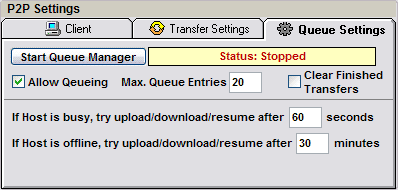
Start/Stop Queue
Manager
If Queue Manager is started, the Manager
tries periodically to finish uploads/
downloads of queued Songs
automatically, in case of hosts are busy/offline or
uploads and downloads are broken.
• Allow Queueing / Max. Queue Entries (n)
Allow (n) queue entries from remote hosts/users to
place an up/download
on your client.
Default value is 20
NOTE: If checked and Queue
Manager is stopped, an incoming
queue request will automatically start Queue Manager.
•
Clear Finished Transfers
If checked, the Queue Manager
will automatically delete all finished transfers
from Queue List.
•
If Host is busy, try upload/download/resume after
(n) seconds
If hosts of queued songs are busy, Queue
Manager periodically tries to start
or finish upload/download/resume every (n) seconds.
Default value is 60
•
If Host is offline, try upload/download/resume
after (n) minutes
If hosts of queued Songs are offline, Queue
Manager periodically tries to start
or finish upload/download/resume every (n) minutes.
Default value is 30
|